
Leadpages and Unbounce are among the most reliable and powerful landing page software options available. But if you have to choose, which will be the most excellent solution?
Both tools offer outstanding features that assist you in building effective landing pages. However, they don’t work the same to achieve their goals. This article will give you a side-by-side comparison between Leadpages vs Unbounce. Let’s check every factor so you can settle on the better tool!
What Is Leadpages?
Since its debut in 2012, Leadpages has worked to completely transform users’ experience in creating landing pages.
This software provides a simple, user-friendly method for building landing pages and intelligently customizing them. Especially, it doesn’t require any technical expertise because the graphic editor will simplify the whole process.
So what will you do? Leadpages needs you to choose a landing page template and use its drag-and-drop editor to arrange the elements. Then, you will have a stunning page.
Leadpages offers a wide range of sophisticated features aside from its pre-made templates. For example, you add videos, CTA (Call-To-Action) buttons, and countdown timers to the layout.
Leadpages also helps you build Facebook Ads to advertise your landing pages. Once the traffic starts to flow in, you can get payments directly from the high-converting landing pages.
Read more:
What Is Unbounce?
Unbounce came out in 2009. This platform is well-known among those who work in digital marketing.
By making use of sophisticated design and marketing automation tools, along with a landing page builder and editor, Unbounce has been successful in living up to that. It gives clients a full design experience without needing any code.
Like Leadpages, Unbounce provides many extra website elements. For instance, you can add and customize pop-ups and sticky bars on your landing page.
When your campaign is going on, Unbounce helps analyze the relevant data to deliver important performance analytics beyond Google Analytics.
The analytics will aid in evaluating the insights and modifying different elements to improve the entire conversion system.
What Is The Difference Between Unbounce vs Leadpages?
Leadpages and Unbounce are among the most commonly used landing page builders. They have outstanding performances at what they aim for. Hence, you need to consider all differences to determine the best landing page builder.
This guide will compare the two tools based on important factors, such as templates, page editors, analytics, traffic, pricing, and many more. These elements are essential when looking for a landing page builder to use.
Ease of Use
Both platforms are easy to use. They don’t require any prior technical knowledge to handle the tools. So it’s a tie here.
The 2-page editors are one feature that makes Leadpages stand out. Most website builders provide a drag-and-drop editor, but Leadpages has taken one step further and given you a second choice.
The drag-and-drop editor of Leadpages is straightforward. Your design tasks will get simpler thanks to the static editor with more options to build the landing page.
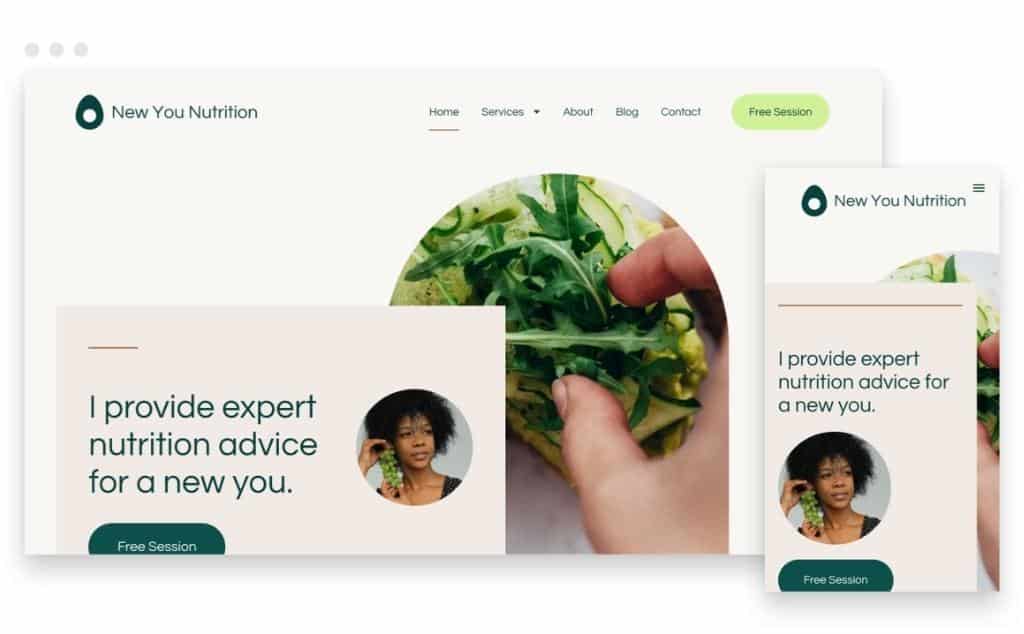
Besides, Leadpages has many supplementary elements, such as countdown timers and icons, to make your process easier.
On the other hand, Unbounce has one landing page editor, which is simple yet dynamic. Thanks to the pixel-precise interface, you can get a stunning landing page.
The whole design process on this landing page builder is about dragging the elements, moving them into the payout, and defining the properties. Hence, beginners can master all these features quickly.
Both Unbounce and Leadpages offer simple drag-and-drop editors for creating landing pages. Moreover, each of them comes with a vast array of customization features.
Nevertheless, since Unbounce has a pixel-precise editor and Leadpages has a drag-and-drop editor built on columns, their layouts will be different. But once you get familiar with them, you will be certain that they both are easy to use.
Landing Page Templates
You have more than 500 pre-made templates for landing page design options and webpages when using Leadpages. So feel free to create unlimited landing pages.
This landing page tool will offer more than 200 free solutions for different website categories if you’re on a tight budget. However, you’ll have to choose a premium package if you’d want the templates with the highest conversion rates.
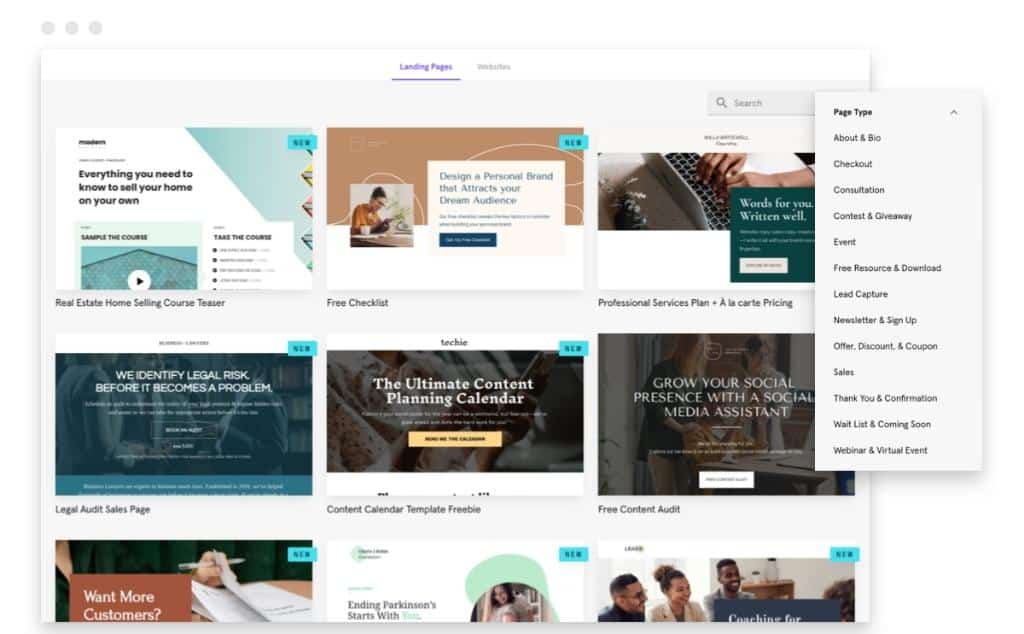
Please note that not all templates can be compatible with the two editors. Leadpages allows each editor to work on specific templates for the best result.
For instance, only 76 of the pre-made templates can work with the drag-and-drop builder. You just need a static editor for the rest.
Whatever category you choose, your template will be responsive on mobile devices. It means that the templates can adjust their formats automatically based on the display ratio of the device.
Unbounce provides fewer templates than Leadpags. There are around 125 options available here, which is equivalent to 25% of what you have on Leadpages.
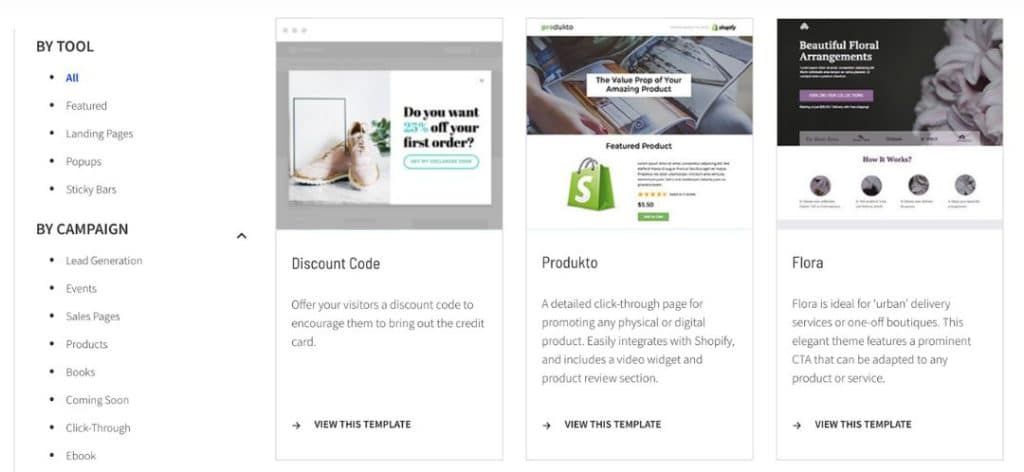
Even though there are fewer Unbounce templates, every one of them has conversion-focused features. Moreover, they support all categories.
Among other sector categories, you may find a number of excellent solutions for SaaS, real estate, tourism, food, mobile apps, and agency websites.
Although Unbounce is a landing page software, you can use it for other purposes. For example, certain Unbounce templates can work with sticky bars and pop-ups.
Page Editor
Leadpages comes with two editors to give you more options when designing your landing page. However, the editor of Unbounce is more powerful.
If you choose Leadpages, you will have two editors to use:
1. Standard editor
This editor is compatible with most landing page templates. Hence, it’s a more popular option than the other tool.
Users who want a quick, simple, and accurate customization should choose this tool. Your learning curve will be quick, and you can build your landing page easily.
Sadly, there is a sacrifice for this kind of simplicity. This standard editor can only provide a static customization design with little flexibility.
2. Drag-and-drop editor
This editor allows for a higher level of customization. You will have access to many more site settings than the standard builder.
How about the Unbound page editor? Although its core functionality could be comparable to other drag-and-drop editors, it employs a different technique and aims for a different objective.
Instead of focusing on simplicity like other tools, Unbounce works on combining critical functionalities in only one interface. The best thing is that you have a pixel-precise layout to build a stunning landing page on Unbounce.
Traffic
In this regard, each tool has advantages. Both come with real-time statistics and a dashboard that accurately displays conversion and traffic rates.
Leadpages shows you a simple-to-use analytics dashboard with live visitor and conversion rate metrics. As a result, there are several ways to monitor how well your landing page is doing.
You have resources to improve your SEO. For example, SEO previews and settings help you edit the meta, description, and keywords. Hence, you can optimize your landing page for the most critical search terms.
Leadpages’ page load speed is a big plus. The speed aids in SEO and decreases bounce rates, and boosts conversions.
AMP landing pages, an impressive feature of Unbounce, let Google know how quickly your page runs. Indeed, it loads so quickly that Google gives it a lightning-bolt logo on mobile devices.
Similar to Leadpages, Unbounce makes it simple to edit your content. To update your meta title, description, and keywords, just select “Page Properties” in the editor.
Finally, Unbounce gives real performance insights that go beyond Google Analytics’ basic data by including extra in-depth information.
The AMP templates from Unbounce might help you shine out since they guarantee quick mobile load times. But remember that you can only get AMP on their most expensive plans.
Unbounce is a fantastic option if you have a bigger budget and AMP landing pages are important to your business. However, Leadpages’ website load times are ideal for anyone trying to cut costs.
Publishing Options
You must first build a domain using a WordPress plugin or link it to a third-party tool to utilize Leadpages and Unbounce. The primary difference is that Unbounce supports permissions for multiple users.
Leadpages consists of various publishing options. There is a free subdomain for each account. You may purchase a Leadpages annual membership and receive a free domain, or you can go for the third-party domain.
A plugin for setting up landing pages, alert bars, and pop-ups for WordPress websites is also available for each Leadpages account. You can upload your website as an HTML page that updates whenever Leadpages modifies it.
Like Leadpages, Unbounce pages allow for a WordPress plugin or a custom domain. Moreover, multi-user permissions simplify the process, including viewers, authors, and admins.
A/B testing
A/B testing involves showing two versions of the same website to different audience categories. This test aids in identifying the version that is generating more conversions. Luckily, you may do A/B tests when using Leadpages and Unbounce.
The A/B test is one of the most terrific features of Leadpages. It aims to help you fine-tune your marketing campaigns.
You may test out many versions of the same landing page to see which one is most effective at capturing visitors and turning them into paying customers.
You may assess the effectiveness of the custom landing pages and adjust your campaign in response to the results. The test also helps you choose the amount of traffic to different pages.
However, A/B testing is only available in more expensive plans. But we advise upgrading your plan to receive the test’s benefits.
Unbounce has seamless A/B testing, too, improving your conversion rates significantly. However, like Leadpages, this platform only includes the tests in higher pricing tiers.
Integration
Both platforms provide many effective integrations. At the end of the day, Unbounce has more native integrations. Yet, both use Zapier, so there is no clear winner here.
Leadpages have tons of third-party apps, such as:
- Analytics: Hotjar, Google Analytics, Hotjar, etc.
- CRM: LionDesk, PipeDrive, Contactually, amoCRM, Pardot, etc.
- Advertising: Facebook Ads, Bing Ads, Instagram Ads, Taboola, Google Ads, etc.
- Marketing automation: Hubspot, Leadsbridge, Autopilot, Marketo, E-goi, etc.
- Payment: PayPal, Stripe, and Gumroad.
Unbounce also partners with various apps. For example:
- Analytics: Kissmetrics, Google Analytics, ClicData, Crazy Egg, etc.
- CRM: amoCRM, Salesforce, Hubspot, Zoho CRM, Agile CRM, etc.
- Advertising: Facebook Ads, Google Ads, Active Campaign, etc.
- Marketing automation: Drip, ActiveDEMAND, Marketo, Autopilot, etc.
Analytics
The real-time analytics of Leadpages displays your page’s performance continuously. This feature can assist you in constantly updating your pages and modifying them in accordance with conversion rates.
On the other hand, your Unbounce account allows you to connect to Google Analytics. Also, your dashboard displays every regular update to each of your pages.
A/B testing plays a vital role in data analytics as the tests tell you which landing page version works better. Since Leadpages and Unbounce have this feature, they are comparable in this regard.
Pricing
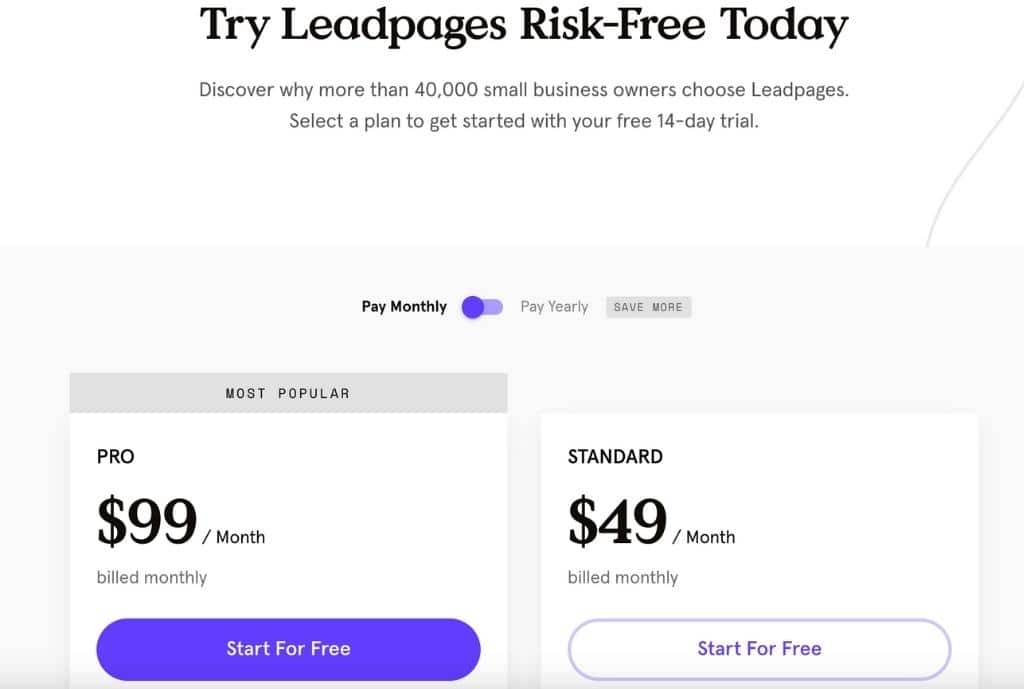
Leadpages will be more cost-effective. You can only start with a 14-day free trial to test how the system works for your business. Then, consider one of the three options below:
- Standard – $49/month: one site, pop-ups, landing pages, alert bars, unlimited traffic with leads, free hosting, lead notifications, mobile-responsive site templates, tech support (via email), standard integrations, and 1-on-1 quick start call.
- Pro – $99/month: 3 sites, alert bars, pop-ups, landing pages, free hosting, unlimited traffic and leads, mobile-responsive site templates, tech support (via email, chat, and phone), lead notifications, standard integrations, 1-on-1 quick start call, online sales, online payments, and unlimited A/B testing.
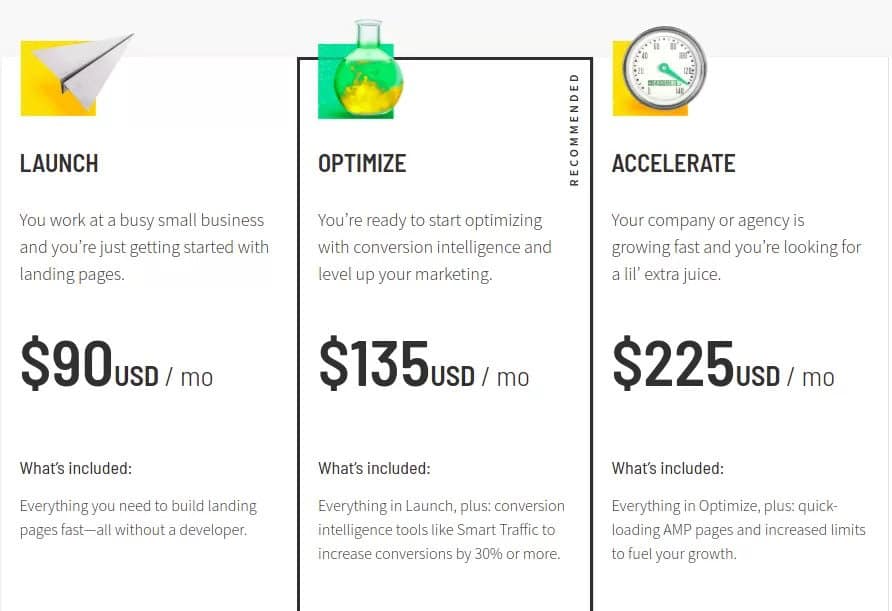
Unbounce has a 14-day free trial too. After deciding to go for the platform, you can consider these pricing plans:
- Launch – $90/month: 500 conversions, 1 domain, 20,000 visitors, unlimited landing pages, pop-ups, and sticky bars.
- Optimize – $135/month: 1,000 conversions, 5 domains, 30,000 visitors, 30% more conversions, unlimited landing pages, pop-ups, and sticky bars.
- Accelerate – $225/month: 2,500 conversions, 10 domains, 50,000 visitors, 30% more conversions, unlimited landing pages, pop-ups, and sticky bars.
- Concierge – $575/month: 5,000 conversions, 100,000 visitors, 25 domains, 30% more conversions, dedicated success team, unlimited landing pages, pop-ups, and sticky bars.
The more expensive the plan, the more features it includes. It’s important to check all the tools that come with the subscription to find the one that satisfies your needs without breaking the bank.
The prices we mentioned above are for monthly payments. If you choose to pay for them yearly, we will reduce discounts for all plans of both Leadpages and Unbounce.
Extra features
Leadpages and Unbounce bring up similar features because they are both landing page builders. However, since they have different tools to perform their tasks, you will find some unique features that only one has.
Impressive Features Of Leadpages
- Leadmeter: Leadmeter offers you immediate feedback on the predicted effects of your adjustments on the conversion rate of your landing page.
- Trigger Links: From your account, you may generate trigger links to use in your email campaigns. They allow your visitors to engage in everything you promote by clicking them.
- Checkouts: With the help of this function, you can effortlessly take payments using all of the major credit cards and distribute your goods or services on any web page.
- Lead Routing: You can link your landing pages to as many integrations as you want. This feature allows you to route leads to multiple tools.
- Education Resources: You will get instructional resources from Leadpages to be able to take full advantage of them. They include free workshops, a knowledge base, group coaching, and tech support.
Impressive Features Of Unbounce
- Smart Traffic: Smart Traffic is a conversion tool operated by AI. It determines the best landing page for each visitor based on their location, gadget, and other factors.
- Dynamic Text Replacement: With the help of this tool, you can compare the content on your landing pages to the content in your paid search advertisements.
- Conversion Intelligence: AI runs Conversion Intelligence to find conversion chances that you don’t often recognize on your own.
- Google Fonts: Your landing page may represent your brand identity thanks to Unbounce’s collection of more than 950 font types.
Leadpages Vs Unbounce Comparison table
Both Leadpages and Unbounce have pros and cons. This comparison table will help you identify their differences and determine the best option for your business.
| Criteria | Leadpages | Unbounce |
|---|---|---|
| Ease of Use | Easy | Easy |
| Templates | Over 500 templates | Over 120 templates |
| Page Editor | Two-editors | One editor but more powerful |
| Traffic | Good with the outstanding load speed | Good with AMP landing pages as a big plus |
| Publishing Options | WordPress plugin or a custom domain | WordPress plugin or a custom domain with multi-user permissions |
| A/B Testing | Yes | Yes |
| Integration | Various options | Various options |
| Analytics | Real-time | Real-time |
| Pricing | Standard: $49/month Pro: $99/month | Launch: $90/month Optimize: $135/month Accelerate: $225/month Concierge: $575/month |
| Extra Features | Leadmeter Trigger Links Checkouts Lead Routing Education Resources | Smart Traffic Dynamic Text Replacement Conversion Intelligence Google Fonts |
| Free Trial | Try Leadpages 14 Days | Try Unbounce 14 Days |
Which Is Better: Leadpages or Unbounce?
Because they are so good at what they do, Leadpages and Unbounce are both quite prominent in the marketing industry.
As we’ve seen in this comprehensive review, each has particular advantages and disadvantages. Here is who we believe might benefit more from each tool.
Who Should Choose Leadpages?
Leadpages is a more cost-effective solution, has more features, and provides a complete solution for your business. All of its plans come with 14-day trials.
- You need a tool to create both a landing page and a whole website on one platform.
- You’re an entrepreneur or small business owner without a strong marketing staff and budget.
- You need an online publishing system that is very DIY-friendly.
- You don’t want your potential to generate leads, website visitors, or landing pages to be restricted in any term.
- You need a built-in checkout method and wish to offer your goods or services online.
- You aim to design your landing page effortlessly using a straightforward grid style.
- You enjoy getting above-and-beyond assistance and weekly conversion tutoring to develop.
Who Should Choose Unbounce?
Unbounce aims to create landing pages with powerful tools and templates for easier conversion of website visitors to customers.
- You have no plan for constructing websites; you only care about how to build landing pages and the lead forms they promote.
- You feel at ease using a free-form editor and prefer the freedom that more customization tools provide.
- You appreciate AMP landing pages on smartphones and are ready to pay more for them.
- You lead a large team, and each person needs a distinct set of duties.
- As you expand, you don’t mind investing in more features, more visitors, and publishing.
Final Verdict
Leadpages and Unbounce are fantastic solutions for your business growth. Comparing them will help you settle on the more suitable option.
If you want a complete landing page builder that handles many pages and domains and has a lot of testing tools, go with Unbounce.
However, if you’re just getting started and searching for an affordable solution, try Leadpages. This platform has many pre-made landing page templates for your needs.
Read more: